Bold text generator
Type up to 200 characters and copy them as bold letters and numbers that stay bold where a field has no bold button.
Tap a style to copy it
Bold
𝐃𝐨𝐨𝐫𝐬 𝐨𝐩𝐞𝐧 𝐚𝐭 𝟕
Made bold in your browser. What you type isn't sent anywhere.
Bold as you type
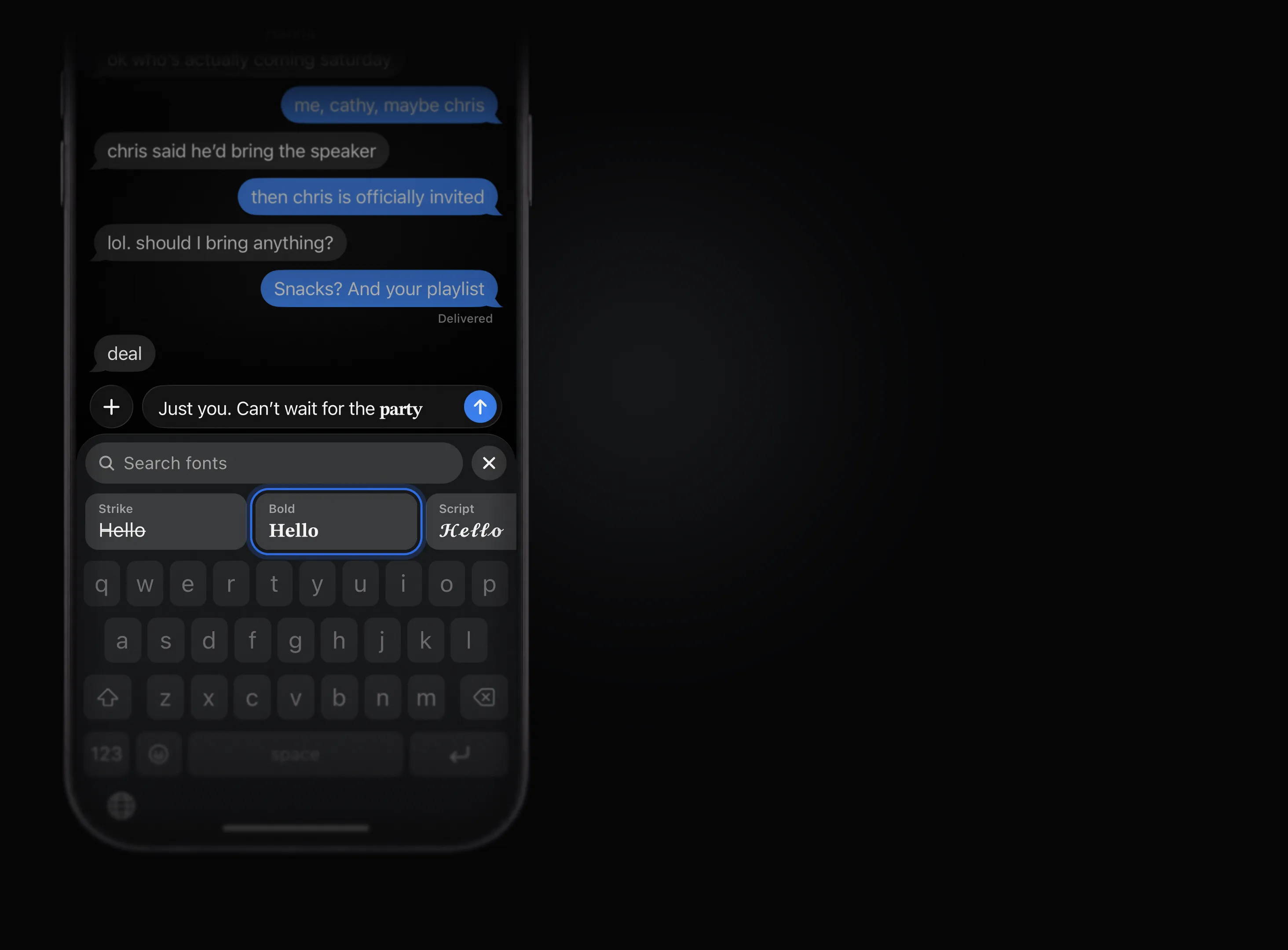
Bold is in Better Keyboard's fonts panel, above the keys. Pick it and what you type comes out bold, with no copying.
App Store
Google Play
Bold text where there’s no bold button
The bold text generator swaps each letter and digit you type for a Unicode character that looks bold. You copy the result and paste it into a field that has no formatting of its own.
Real bold works another way. In a document or an email, the letters stay ordinary and an instruction travels with them: draw these heavier. A plain text field has nowhere to keep that instruction, so there is no bold button. The bold on this page needs no instruction, because the heaviness is in the characters. 𝐡𝐞𝐥𝐥𝐨 is five characters that aren’t h, e, l, l and o. You paste it like any other text.
If the place you’re writing has a bold button, use it. That bold is real formatting, and everything in the last two sections of this page is the reason to prefer it.
Bold letters and bold numbers
Bold is a complete style. All 26 capitals, all 26 small letters and all ten digits have a bold character, in three unbroken runs. Nothing is borrowed from another block, so every letter comes from the same set. Cursive is complete too, but has no digits. Italic and Outline each borrow letters from another block.
So a time, a score or a date goes bold with the words around it: 𝐅𝐫𝐢𝐝𝐚𝐲 𝟔𝐩𝐦.
What stays as you typed it:
- Punctuation and emoji.
- Letters with no plain A to Z underneath, such as ß and ø. “Straße 12” becomes 𝐒𝐭𝐫𝐚ß𝐞 𝟏𝟐, with a plain ß in the middle.
- Other alphabets.
Accented letters go bold and keep their accent: Café becomes 𝐂𝐚𝐟𝐞́.
How the bold font copy and paste works
There is no font in it. Unicode’s Mathematical Alphanumeric Symbols block holds a bold alphabet meant for mathematical notation. The tool maps your text onto it:
| You type | Becomes | Starting at |
|---|---|---|
| A to Z | 𝐀 to 𝐙 | U+1D400 |
| a to z | 𝐚 to 𝐳 | U+1D41A |
| 0 to 9 | 𝟎 to 𝟗 | U+1D7CE |
Each run is in order, so the letter you type and the letter you get sit at the same place in their alphabets. The ranges were checked against Unicode’s character data on November 27, 2026.
The conversion happens in your browser as you type. The page makes no network request with your text. The field takes up to 200 characters, and while it’s empty every style shows “Hello”.
A worked example: one line of bold
Take a line from an event post: “Doors open at 7”. The tool returns 𝐃𝐨𝐨𝐫𝐬 𝐨𝐩𝐞𝐧 𝐚𝐭 𝟕.
Every letter changed, and so did the 7. The three spaces didn’t.
Now count it. The plain line is 15 UTF-16 units long. The bold one is 27. Every character in the mathematical block sits outside Unicode’s Basic Multilingual Plane, and UTF-16 needs two units for each character out there. Twelve bold characters make 24 units, plus three spaces. “hello” in bold is 10 units, not 5. Where a character limit counts UTF-16 units, as the field on this page does, bold text uses it up nearly twice as fast.
What a screen reader does with bold letters
This is the test that bears most directly on this page. Adrian Roselli’s article Don’t Use Fake Bold or Italic in Social Media, posted March 5, 2025 and updated November 20, 2026, ran text like this through screen readers. His results:
- “VoiceOver / macOS 15.3.1 / Safari 18.3. Doesn’t announce the fake bold nor fake italic.”
- The same on “VoiceOver / iPadOS 18.3.1 / Safari”.
- “TalkBack 15.2 / Chrome 133. Announces the fake bold and fake italic as if it is regular text.”
In none of the three does the emphasis reach the person listening. Bold made this way is something you see. If the bold word is the point of the sentence, write the sentence so it still works without it.
Unicode says as much from its side. Of this block, its standard says: “The characters in this block are intended for use only in mathematical or technical notation, and not in nontechnical text.” And the characters “should not be used to represent styling of nonmathematical text.”
Keep bold to a word or a line
Bold marks the thing a reader should see first: a date, a name, a heading above a list. When a whole paragraph is bold, nothing in it stands out, and all of it carries the costs above.
One more cost comes from what these characters are. Software that applies Unicode’s compatibility normalization (NFKC) reads 𝐡𝐞𝐥𝐥𝐨 as hello, and software that doesn’t reads five characters that aren’t that word, so the plain word and the bold one don’t match.
A few related choices:
- To cross something out next to the bold part, use strikethrough text, which works by adding a stroke after each character.
- To line up short codes or columns, monospace also has its own digits.
- All eight keyboard fonts are on one page with the same text in each.
If you bold things often, copying from a web page gets slow. Better Keyboard has Bold in the fonts panel above its keys, so you pick it and type. The rest of the keyboard is under features.
Questions
How do I make text bold where there's no bold button?
Type it in the field on this page and copy the bold result. The bold is in the characters, so it pastes into a plain text field as it is.
Can I make numbers bold?
Yes. Unicode has ten bold digits, starting at U+1D7CE, and this tool converts 0 to 9 along with the letters.
Is this the same as real bold?
No. Real bold is formatting applied to ordinary letters. This swaps each letter for a separate Unicode character that looks bold.
Where a field has a bold button, that button gives you the real kind. This is for fields without one.
Can screen readers read bold text made this way?
Not as bold. In Adrian Roselli's 2025 tests, TalkBack 15.2 with Chrome 133 "Announces the fake bold and fake italic as if it is regular text", and VoiceOver with Safari on macOS 15.3.1 "Doesn't announce the fake bold nor fake italic."
The keyboard your phone
should have come with
Dictate, swipe or type in any app, and it comes out right. None of it leaves your phone.