Strikethrough text generator
Type or paste up to 200 characters and the tool draws a line through each one, ready to copy.
Tap a style to copy it
Strike
S̶o̶l̶d̶ o̶u̶t̶
The line is added in your browser. What you type stays on this page.
Cross out text while you type
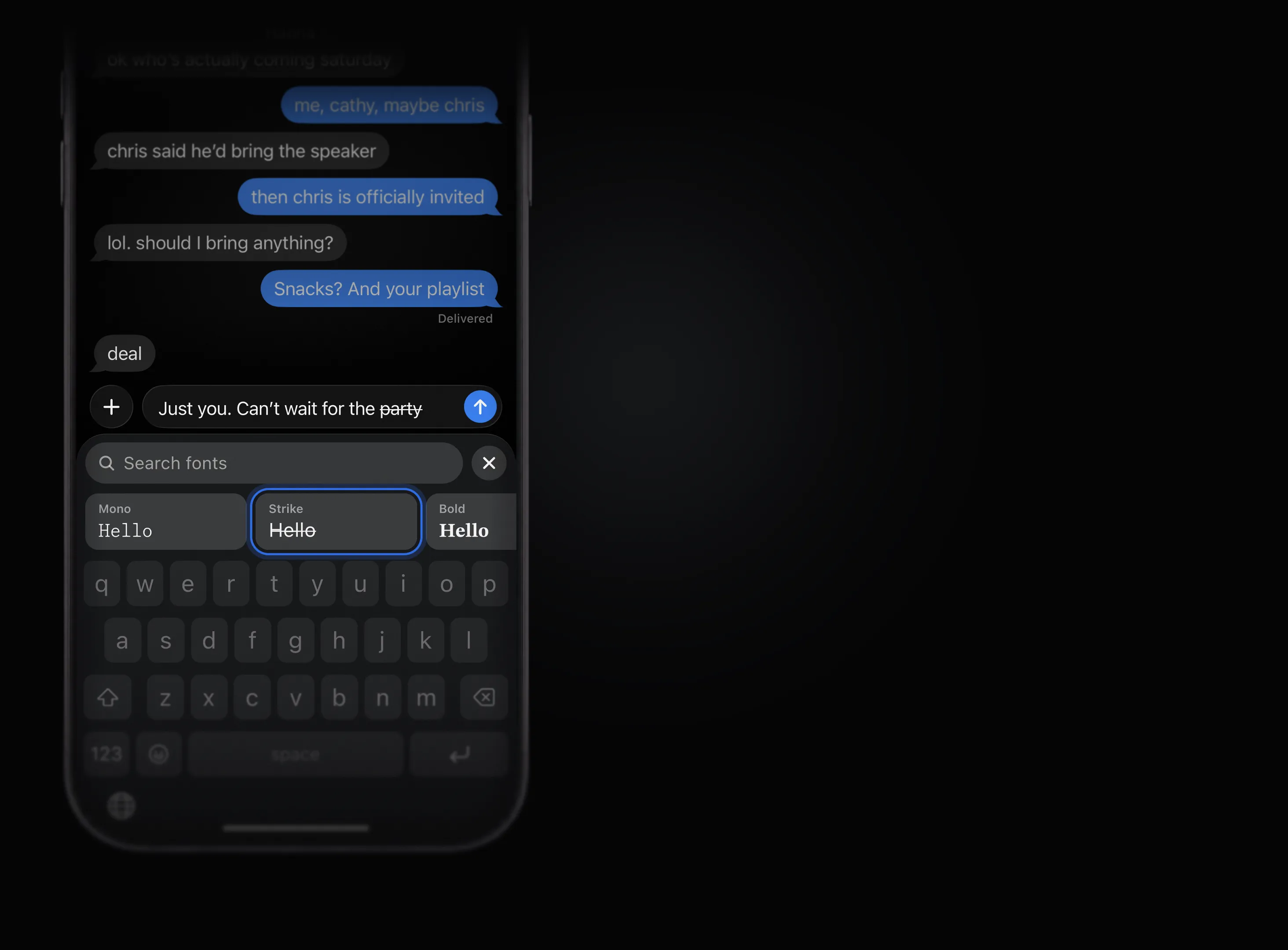
Better Keyboard has Strike in its fonts panel, so your words come out crossed out as you type them.
App Store
Google Play
Strikethrough isn’t a letter swap
The other styles on this site replace your letters. Bold trades each a for a bold a, a different character. Strikethrough leaves every letter exactly as you typed it and adds one thing after it: a combining mark that draws a stroke across the character before it.
That difference decides nearly everything else on this page. The swap styles only know A to Z, a to z and sometimes the digits. Strike has no alphabet to run out of. The tool adds its stroke after any character: a letter in any script, a digit, a comma, an emoji.
It also means the lines belong to the text. They aren’t formatting laid on top of it, so they’re still there after you copy the result.
What gets a stroke and what doesn’t
| You type | What happens |
|---|---|
| Letters, in any alphabet | One stroke each: П̶р̶и̶в̶е̶т̶ |
| Digits and punctuation | One stroke each: 9̶,̶ |
| An accented letter, such as é | Counts as one character and gets one stroke: é̶ |
| An emoji | Counts as one character and gets one stroke: 🎉̶ |
| A space | Skipped. No stroke, so words stay separate |
Only the spaces come through bare. That’s the reverse of cursive, where digits, ß and every non-Latin letter pass through untouched.
The tool strikes everything in the field. To cross out part of a sentence, convert only the words you want crossed out, copy them, and type the rest around them.
How the tool makes cross out text
The mark is U+0336, which Unicode names COMBINING LONG STROKE OVERLAY. A combining mark attaches to the character before it, the same way an accent does. Its name was checked against the Unicode character data on November 27, 2026.
The tool walks through your text one visible character at a time. An emoji or an accented letter can be several code points, and the tool treats each as one character, so the stroke lands after the whole thing and not inside it. After each one it adds a single U+0336. Spaces get none.
Because your letters are never replaced, there’s nothing for software to convert back: Unicode’s NFKC normalization, which returns the swap styles to plain letters, leaves the strike marks where they are.
Why the crossed-out line can look broken
There’s no single line drawn across the word. Each character carries its own stroke, and the font on the reader’s screen draws it. The tool decides where the marks go. The font decides what they look like.
Three things follow.
- Gaps between letters. The font sets where each stroke starts and stops. In some fonts the strokes meet. In others you can see breaks between letters.
- Gaps between words. The tool skips spaces, so the line always stops at the end of a word and starts again at the next.
- Emoji and unusual characters. The mark is there after each one, but whether a visible line shows through it depends on the font.
If the look matters, send the line to yourself and check it on a phone before you post it.
“Sold out”, counted
The field at the top opens with “Sold out”, the kind of thing you’d put over an old listing. Crossed out, it’s:
S̶o̶l̶d̶ o̶u̶t̶
Typed, that’s 8 UTF-16 units: seven letters and a space. The result is 15. Each of the seven letters gained one unit for its mark, and the space gained nothing.
Other characters follow the same sum. “Привет” is 6 units and П̶р̶и̶в̶е̶т̶ is 12. An emoji such as 🎉 is 2 units on its own and 3 with its mark.
Before you use crossed-out text
It doubles the length. Every visible character costs one extra unit. Plain letters with no spaces double exactly, and a line with spaces comes in just under. The tool’s field takes 200 units of typed text, and the crossed-out result can run to 400. Check it against the limit of wherever it’s going.
Screen readers. Adrian Roselli’s tests of fake bold and italic text didn’t include a stroke mark after every letter, so this style is untested. Crossing something out usually means “not this,” so don’t count on a listener hearing that there was a line. If the meaning depends on it, say it in words as well.
Shorter is clearer. A word or a short phrase is enough for the joke or the correction.
Strike in Better Keyboard
Converting one phrase here and pasting it is fine now and then. Better Keyboard has the same style, named Strike, in the fonts panel above its keys, so your words come out crossed out as you type. You can see it under features on the home page. The fonts page has all eight styles, including monospace for codes.
Questions
How does the strikethrough generator cross out text?
It adds a Unicode combining mark, U+0336, after each character. The mark draws a stroke through the character before it.
Can I cross out emoji and other alphabets?
Yes, the tool adds the stroke mark after any character, emoji included: П̶р̶и̶в̶е̶т̶ or 🎉̶. Whether the line shows through each one depends on the font on the screen.
Why does the line have gaps in it?
Each character gets its own short stroke, drawn by the font on the screen you're looking at. The strokes don't always meet, and the tool skips spaces, so there's a gap between words.
How long is crossed-out text?
About twice the plain text. Every visible character gains one UTF-16 unit for its mark, so hello goes from 5 units to 10.
The keyboard your phone
should have come with
Dictate, swipe or type in any app, and it comes out right. None of it leaves your phone.